Add trade
Overview /  Add trade
TE3 offers you several different methods to add new trades to your site. Navigate to the Overview menu, click on the Add trade button and select a desired action:
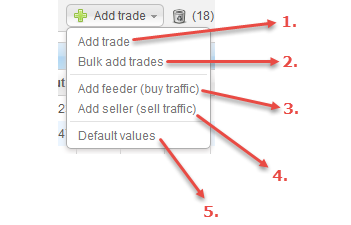
| # | Action | Description |
|---|---|---|
| 1. | Add trade | add single trades to your site. |
| 2. | Bulk add trades | add multiple trades to your site. |
| 3. | Add feeder (buy traffic) | buy traffic from traffic brokers. |
| 4. | Add seller (sell traffc) | sell some of your traffic. |
| 5. | Default values | change default values for new trades. |